# Give Your Agent a Phone
Rush now connects LumisReach, so an agent running on Rush can place a phone call or hold a text conversation, then read back the transcript, summary and recording.
Muqsit Nawaz, 2026-11-22

An invoice is 31 days overdue. An agent can find it, read the customer's payment history, see that two reminder emails went unanswered and write a third. The step after that has always gone back to a person, because the step after that is a phone call: someone has to ring the customer and ask when the money is coming.
Rush now connects [LumisReach](https://lumisreach.com), a voice-call and SMS service from Lumis Laboratories with its own MCP server. The agent places the call from its own cloud computer, a LumisReach voice agent holds the conversation toward the goal the agent wrote, and the transcript, the summary and the recording come back to the run, next to everything else the agent did. The flow below follows LumisReach's own documentation of its tools.
## Where the phone fits
Rush is the platform companies define, integrate and govern their agents on. A company describes an agent once, and Rush runs it in its own cloud computer, signed into the accounts it needs, started by the company's product, a schedule or an event, with a record and the cost of every run. LumisReach adds one more account to that list: a phone line.
The work splits cleanly. LumisReach places the call: it dials (screening each number against Do Not Call lists, [its site says](https://lumisreach.com)), speaks, listens, leaves a voicemail or retries. Rush runs the agent that knows why the call is needed, what to ask, and what to do with the answer.
Rush runs the agent and keeps the record. LumisReach places the call and hands back what was said.
## Four jobs that end in a call
Most companies have a list of jobs an agent could do up to the last step, where the last step is a person dialing a number. The pattern is the same each time: the agent reads something before the call, the call has one goal, and the agent acts on the answer.
| The job | Before the call | The call's goal | After the call |
| --- | --- | --- | --- |
| [Confirm an appointment](/run/confirm-appointments/lumisreach/) | Reads tomorrow's calendar | Confirm the time, or find a new one | Updates the event |
| [Chase an unpaid invoice](/run/chase-unpaid-invoices/lumisreach/) | Reads the overdue invoice and its reminders | Learn when payment will arrive | Records the promised date |
| Check a supplier's stock | Reads the open order | Ask whether 40 units ship this week | Writes the answer to the order sheet |
| [Follow up a lead](/run/call-new-leads/lumisreach/) | Reads the form the lead filled in | Qualify and book a meeting | Posts the summary for sales |
The call sits in the middle of each job. That is why it matters where the agent runs. An agent with its own computer, its own connected accounts and a record of every step can go from the calendar to the call to the calendar again without anyone at a keyboard. Rush already connects Google Calendar, Google Drive, QuickBooks, Slack and Linear, among others, so the reading and the writing on either side of the call are connections the agent can already hold ([Connections](/docs/concepts/connections/)).
## What the agent sees
To the agent, LumisReach is a set of tools on an MCP server at `https://mcp.lumisreach.com/mcp`. A call is one tool call, `start_ai_phone_call`, with the numbers to ring, the goal, instructions for how to talk, an opening line, a voice, how many times to retry, and a cap on the call's length (10 minutes unless the agent sets another). Roughly:
```json
{
"to_numbers": ["+14155550142"],
"goal": "Find out when Dana's team will pay invoice 1043, now 31 days overdue.",
"instructions": "Be brief and polite. If they dispute it, ask why.",
"retry_attempts": 1,
"max_call_duration_seconds": 300
}
```
LumisReach answers with a job and starts dialing. The agent then asks `get_quick_action_status`, which reports each number's status, including `completed`, `no_answer`, `failed` and `opted_out`, with a summary of the conversation. `get_call` returns the transcript, and `get_call_recording` the recording.
Every request and answer above is a tool call in the run, so the record shows what the agent asked for and what came back.
Texts work the same way. `start_ai_text_conversation` opens an SMS thread and keeps answering replies until the goal is met, and `send_quick_text` sends one message exactly as written. `list_calls` reads past calls, and `setup_ai_phone_number` buys a number with an AI receptionist that answers it. Quick calls and texts go out from numbers LumisReach owns, not from yours.
## Connect it
LumisReach is sold to businesses, and its MCP server takes an API key rather than a sign-in, so the key is the whole connection. Four steps:
1. **Have a LumisReach account.** Sign up at [lumisreach.com](https://lumisreach.com). Each person who connects it uses their own account.
2. **Create an API key** in LumisReach under [Settings > Developer API](https://app.lumisreach.com/settings/api). It starts with `lumisreach_` and is shown once, so copy it then. Calls, texts and numbers need a card under **Settings > Billing**; reading calls and transcripts is free.
3. **Paste it into Rush.** In the console, open **Settings > Connections**, press Connect on LumisReach, paste the key and press Add app. Rush lists the server's tools with the key before it saves it, so a key LumisReach refuses is never saved.
4. **Name it on a run.** Add `lumisreach` to a run's `connections`, or switch it on in a Project, and the agent can use LumisReach's tools.
LumisReach documents each tool in its [MCP reference](https://docs.lumisreach.com/api-reference/mcp). The [LumisReach integration page](https://getrush.ai/integrations/lumisreach/) keeps these steps current.
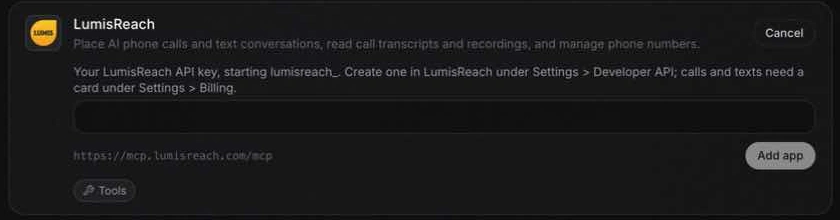
*Connecting LumisReach in the console, captured from cloud.getrush.ai on November 20, 2026: paste the key, and Rush checks it with LumisReach before it saves.*
From the API, with a Rush API key, the catalog lists LumisReach with `auth: {mode: "bearer"}`, which means it takes a token rather than a sign-in:
```bash
curl -sS -H "Authorization: Bearer $RUSH_API_KEY" \
https://api.phoenix.so/o/$RUSH_ORG/agents/available \
| jq '.mcp_servers[] | select(.slug == "lumisreach")'
```
Connect it once with your LumisReach key:
```bash
curl -sS -X POST https://api.phoenix.so/me/connections \
-H "Authorization: Bearer $RUSH_API_KEY" -H "Content-Type: application/json" \
-d '{"type": "mcp", "name": "LumisReach", "url": "https://mcp.lumisreach.com/mcp",
"auth": {"mode": "bearer", "token": "lumisreach_…"}}'
```
Then any run can name it in `connections`, and only runs that name it get it:
```bash
curl -sS -X POST https://api.phoenix.so/o/$RUSH_ORG/sessions \
-H "Authorization: Bearer $RUSH_API_KEY" -H "Content-Type: application/json" \
-d '{"agent": "claude",
"input": "Call +1 415 555 0142 to confirm the 10:00 meeting with Dana tomorrow.",
"connections": ["lumisreach"]}'
```
The session answers at once; the outcome comes back on the session read, the live stream or a webhook, as with any run ([quickstart](/docs/quickstart/)).
## What a call costs
There are two bills, and they stay separate. LumisReach charges calls and texts to your own LumisReach account: $0.20 for each call placed plus $0.20 a minute, and $0.05 for each text message. Rush charges the run the way it charges every run, for the computer and the model. Rush adds nothing to LumisReach's prices.
1-minute call
$0.40
3-minute call
$0.80
5-minute call
$1.20
10 minutes, the cap
$2.20
LumisReach's price for one quick AI call that connects, by length: $0.20 to place it plus $0.20 a minute. Source: LumisReach MCP docs, November 2026.
The length cap is what bounds a call. A call that runs to the default 10 minutes costs $2.20, so set `max_call_duration_seconds` to what the job needs, and remember that each retry is another call placed.
## Who answers for the call
An agent that can call people needs rules a person would follow, and the responsibility for them stays with you.
**Consent is yours.** In the United States, automated and AI-voice calls fall under the Telephone Consumer Protection Act, and other countries have their own rules. LumisReach [says](https://lumisreach.com) it checks every number against federal, state and its own Do Not Call lists before it dials. That stops a call to someone who asked not to be called. It does not show that the person you are calling agreed to hear from you; only your own records can. Call people who gave you their number for this kind of call, and when a status comes back `opted_out`, have the agent record it and stop.
**The other limits, as of today:**
- Quick calls come from LumisReach's shared numbers, so the person sees a number that is not yours.
- A saved agent you make for each of your own app's users cannot hold a server that takes a token yet. LumisReach connects to your account and the runs you start, not to each of your users' agents ([Connections](/docs/concepts/connections/)).
- The voice on the call is LumisReach's agent. The Rush agent sets the goal and reads the result; it does not speak on the call itself.
## Questions people ask
**Do I need a LumisReach account?** Yes. The connection is your own LumisReach API key, and LumisReach bills calls and texts to that account at its own prices. Rush bills the run's compute and models, as for any run.
**Can my product's users each bring their own LumisReach?** Not through an agent made from a template yet: a template that serves many end users refuses a server that takes a token. A member of your org connects their own key and runs with it.
**Does the agent talk on the call?** No. LumisReach's voice agent holds the conversation. The Rush agent writes the goal and instructions, places the call through LumisReach's tools and reads back the status, summary and transcript.
**Whose number does the person see?** A quick call goes out from a shared LumisReach number. LumisReach's own docs cover numbers you buy and branded caller ID.
**What about consent?** LumisReach's site says it checks every number against Do Not Call lists before it dials; its API docs do not repeat it. Consent to call someone stays with whoever starts the run.
## What comes next
Two more posts follow this one. On December 1, an automation that calls a new lead within minutes puts LumisReach behind a form submission, with no person in the loop until the meeting is booked; its request is already on [its task page](/run/call-new-leads/lumisreach/). On December 8, a post on connecting an MCP server that takes only an API key explains the engineering: how Rush recognizes a server like LumisReach, asks for its key, and checks it before saving.
A transcript on a run is the kind of record we have argued for before: when an agent acts in the world, [what it did is what you review](/blog/read-its-actions/), and the place it did it from should be [a computer of its own](/blog/every-consumer-got-a-cloud-computer/). A phone call is an action with a person on the other end. It belongs in that record more than most.